Week 12
Monday * March 29
Working with dynamic text, components, and XML in Flash.
- LAB Work on Lesson 8 (bring book and CD to class!) -- plus extra XML goodness!
- LECTURE 1 Examples of dynamic data in online journalism packages.
- LECTURE 2 CLASS CANCELED THURSDAY, APRIL 1. Professor McAdams will be out of town.
DUE 9 a.m. Monday (via e-mail): Critique 3
READ Lesson 8 in Adobe Flash CS4 Professional Classroom in a Book (ACiaB).
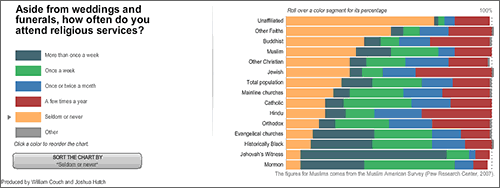
EXAMINE An in-depth look at USA's religious beliefs, practices (USA Today)
Lots of external data. Lots of dynamic text fields.
Notes * * *
Flash components: These are supposed to save us time in Flash development, but I find most Flash components to be too inflexible. The exception: The Flash video components (we used these last week) are easy to use and very helpful.
XML data: Most news organizations feed external information into Flash via XML. You may never need to create an XML document from scratch, but you may well be expected to edit one, or to insert data into an XML format. NOTE: You do NOT need a Flash component to load text, images, etc., from outside Flash.
Dynamic text: When text comes into Flash from an external source, it must be displayed in a text field of the type Dynamic. (The other two types of text in Flash are Static and Input.) When you create a Static text field, you specify font, style, size, color, anti-aliasing, alignment and position (X,Y). With Dynamic text, you also need to consider :
- An instance name for the text field (ending in _txt)
- Character Embedding: On the Properties panel, under Character (see Adobe's tutorial about how to embed fonts in the Library)
- Multiline: On the Properties panel, under Paragraph (Behavior)
- Selectable: If this button (on the Properties panel) is pushed in, then people can select and copy the text. Sometimes you want this, but usually you DO NOT. You don't want the text cursor (an "I" bar shape) to show up instead of the usual arrow cursor when people are rolling over a map, for example.
Supplemental * * *
- Enhanced Lesson 8 with extra XML goodness added. Download this zipped folder (240 KB) and open it to extract three files, including a PDF with instructions.
- Create dynamic text fields using XML and Adobe Flash CS4, by Ruth Stryker. This is a really simple little tutorial showing how to design an online restaurant menu.
- XML Example with Flash CS4 - AS3: An example (from me) that includes images and text loaded from an XML file into a simple slideshow format (no components are used). Download the FLA to see the commented ActionScript. (This is the books example we viewed during lab.)
- Adobe ActionScript 3.0: Working with XML: Resource from Adobe.
- Components Learning Guide for Flash CS4/ActionScript 3: There is much more to Flash CS4 components than the two that you used in Lesson 8 in the book.
- Using ActionScript 3.0 Components (Flash CS5): These appear to be the same as the ones we have now.
- ActionScript 3 samples for Flash CS4 Professional: Free download of a whole bunch of FLAs that demonstrate various techniques in ActionScript 3.0.