Exercise 1
FOCUS Web page design
PURPOSE Show your highest level of skill in creating a single page using only the assets supplied to you.
VALUE 2 points (see Grading): 1 point for originality and the overall appearance, 1 point for your CSS and XHTML. Note: 1 point will be deducted if your page looks significantly different in Firefox 3 and IE (7 or 8).
DETAILS You will find one image and one text file in this folder. You must use all of the text, and you must use that image. In Photoshop, do anything you like to the image (experiment with filters!). Colors and fonts are your choice. You may use one additional image if you create it yourself. Your mission is to create the best-looking page you can, using ONLY XHTML/CSS and Photoshop.
Deadlines for all assignments are on the Week pages. For example, see Week 2.
Requirements
- Use XHTML Strict or Transitional in your DOCTYPE declaration.
- The text must be HTML text. Do not change any of the text provided into an image.
- Use the photograph of Abe on the page (using an IMG tag) rather than as a background image (a background image would not be viewed by users who do not have CSS). You must use Abe as a NON-background image (IMG).
- Your page must fill a 1024 x 768 browser window and not require any scrolling at that screen resolution. Hint: The viewable size at that resolution is roughly 1000 x 500. Be careful with your margin and padding specs!
- Do not use any <font> tags. Use only CSS for fonts and colors.
- Do not use any HTML tables. Use only CSS for positioning. Use of <div> is encouraged.
- Do not use any spacer GIFs.
- Copying HTML or CSS from other sites or pages is not acceptable and will result in a failing grade. You are expected to do your own work and be able to explain the details of your HTML and CSS on demand.
- Link the text for the image source credit. (The URL is provided in the text file.) Note: Do NOT make the URL visible on your page.
TEST your finished page in BOTH Firefox 3.0 (or later) AND IE 7 (or later). If the page looks wildly different in one or the other -- you lose one point! Mac users: You MUST test on Windows. Windows users: You are not required to test on a Mac, but it would be a wise thing to do. I will view all your work on BOTH Mac OS X and Windows XP Pro.
Use an external style sheet. Do not include the styles in the same XHTML document with Abe.
Examples
The first example below would get 2 points. Notice that "filling" the 1024 x 768 window does NOT mean that things need to touch the edges. Use space intelligently in your page design. The use of "whitespace" in design is covered here (in case you don't know what it is). Also note that this example is not wildly creative. I encourage you to be more original. The word "Gettysburg" is a background image (optional).
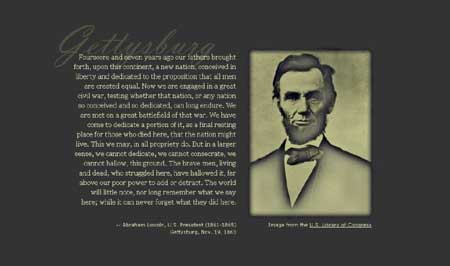
The following example would get 0 points.
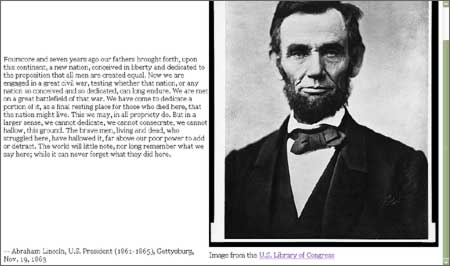
Notice that in the poor example, the image is so tall that the top of it scrolls off the screen (scrollbar visible at right). The use of space is very awkward. The text rams against the left and right sides, but a large amount of emptiness gapes above and below the text. This is a poor use of whitespace.
If I see a scrollbar anywhere, you automatically lose 1 point.
Both screenshots shown above are from a monitor at 1024 x 768 resolution (Firefox 1.5 at full-screen, Windows XP Professional).
How to Hand It In (and Meet the Deadline)
When you finish creating the page and editing the image, upload the HTML file, the CSS file and the image file to a Web server. Then send the URL for the Web page to me via e-mail BEFORE the deadline.
If you do not have a Web host of your own, then use Plaza (Gatorlink).
If you have never uploaded files with Dreamweaver before, then read Dreamweaver Basics (PDF, 403 KB). You do not need to use Dreamweaver; it's just a suggestion.
If you don't know how to FTP, see this tutorial.
DO NOT send the files to me. I want a URL, not the files.
A complete URL begins with http://
If you do not send me a working URL by your deadline, you earn 0 points for this assignment.