Customizing the Audio Player
This tutorial uses the Audio Player Wordpress plugin from 1pixelout (by Martin Laine). These instructions concern using that player on non-Wordpress HTML pages. The main tutorial is on another page.
This page deals with customizing the appearance of the player. It also provides parameters for making the audio loop (repeat) or auto-start (look under the heading "Other Options").
Here is the default appearance of the player:
If you are using Internet Explorer, you will probably need to click the player twice to make it play. (All other Web browsers will let you click once.) If you do not see the MP3 player, then you don't have the Flash player installed. (More than 90 percent of all Internet users do have it.)
You can see a radically different color scheme on this player near the bottom of this page.
Tutorial
You will need to add code to the bare-bones markup that is used for the default player. This is shown below in blue.
<script language="JavaScript" src="http://www.fakedomain.com/myname/audio/audio-player.js"></script>
<object type="application/x-shockwave-flash" data="http://www.fakedomain.com/myname/audio/player.swf" id="audioplayer1" height="24" width="290">
<param name="movie" value="http://www.fakedomain.com/myname/audio/player.swf">
<param name="FlashVars" value="playerID=audioplayer1&
bg=0xf8f8f8&
leftbg=0xeeeeee&
lefticon=0x666666&
rightbg=0xcccccc&
rightbghover=0x999999&
righticon=0x666666&
righticonhover=0xffffff&
text=0x666666&
slider=0x666666&
track=0xFFFFFF&
border=0x666666&
loader=0x9FFFB8&
loop=no&
autostart=no&
soundFile=http://www.fakedomain.com/myname/audio/music.mp3">
<param name="quality" value="high">
<param name="menu" value="false">
<param name="wmode" value="transparent">
</object>
First, PLEASE NOTE that you cannot separate the lines as I have above. There can be NO hard returns from the beginning of <param name= to the end of the filename .mp3">
Note also that it is essential that each instance of & (the ampersand) remain in place.
Here is Martin Laine's diagram showing what nine of the options mean:
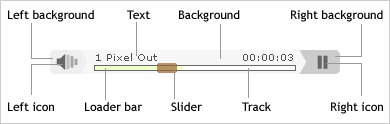
There are three additional color options and two options that are not related to the appearance of the player.
Color Options
There are 12 color options:
| bg | Background color (see diagram) |
| leftbg | Left background (see diagram) |
| lefticon | Left icon (see diagram) |
| rightbg | Right background (see diagram) |
| rightbghover | The color the right background will change to on mouseover |
| righticon | Right icon (see diagram) |
| righticonhover | The color the right icon will change to on mouseover |
| text | Text (see diagram) |
| slider | Slider (see diagram) |
| track | Track (see diagram) |
| border | This is the line surrounding the loader bar |
| loader | Loader bar (see diagram) |
If you don't understand hexadecimal colors, see this page.
Other Options
These options are not related to the appearance of the player:
| loop | Will the audio file repeat automatically? | Can be yes or no |
| autostart | Will the audio file start to play without the player being clicked? |
Can be yes or no |
NOTE that the two options shown above do appear in the blue highlighted code above.
Another customization people often ask about is getting the name of the song or artist to display in the player, like this:
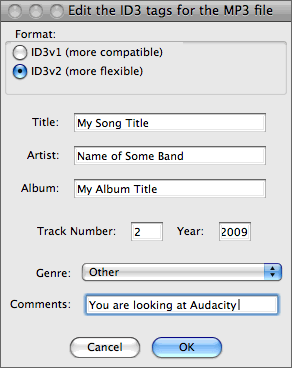
The player itself does not create the artist name and the song title -- these are embedded in the MP3 itself. If they are there, the player will display them as you see here. There are probably a zillion ways to do this, so I will show you just one example.
Example of the Color Changes
Here is a modified version of the same player:
Here is the code that made it:
<object type="application/x-shockwave-flash" data="http://www.fakedomain.com/myname/audio/player.swf" id="audioplayer2" height="24" width="290">
<param name="movie" value="http://www.fakedomain.com/myname/audio/player.swf">
<param name="FlashVars" value="playerID=audioplayer2&
bg=0x999999&
leftbg=0x000000&
lefticon=0xffffff&
rightbg=0xffffff&
rightbghover=0xcc0000&
righticon=0x000000&
righticonhover=0xcccccc&
text=0xcc0000&
slider=0xcc0000&
track=0xcccccc&
border=0xcc0000&
loader=0xffcccc&
loop=no&
autostart=no&
soundFile=http://www.fakedomain.com/myname/audio/music.mp3">
<param name="quality" value="high">
<param name="menu" value="false">
<param name="wmode" value="transparent">
</object>
THANK YOU to the fabulous Ryan Marganti for catching an error and taking the time to send a correction to me!